How I Built My AI Assistant's Brain — And What Kept Breaking It
Ten days ago I set up an AI assistant on my laptop — not a chatbot, but an actual operating system for my life: calendar, task management, a fleet of specialist agents, and a local web dashboard I can pull up from my phone.
Here’s how it started, what kept breaking, and what each failure taught me.
Day 1: What I Was After
I didn’t want another productivity app. I wanted something that woke me up every morning knowing what mattered, kept track of open loops I’d forget, and routed work to the right specialist without me having to think about it.
The setup I landed on was OpenClaw — an open-source AI gateway — running locally on my MacBook, connected to Claude via the Anthropic API. I gave the assistant a name: Higgins. Chief of staff. Single point of contact. Orchestrator.
From day one, Higgins could talk to me on Discord, read my calendar, and coordinate four specialist agents:
- 🔧 Builder — writes and ships code
- ✍️ Content — social posts, newsletters, scripts
- 🔍 Research — deep dives, competitive analysis
- 📋 Product — specs, strategy, system design
The idea was simple: I talk to Higgins, Higgins routes to the right specialist, I get results.
The First Problem: Rate Limits at 5-Minute Intervals
The morning after I set everything up, Discord started rejecting messages every five minutes.
It turned out several background processes were all trying to use the same account at the same time:
- OpenClaw had a built-in heartbeat running every 30 minutes
- Each heartbeat sent a Discord message, which kicked off a Claude run
- I also had four separate task checkers running every 5 minutes — one for each agent
- All of them were sharing the same token, so they were running into the same limit
In other words, I hadn’t built one noisy process. I’d accidentally built several small ones that stacked on top of each other.
The fix was straightforward: turn off the default heartbeat, remove the old task pollers, and switch the default model to a lighter one. Discord went back to normal almost immediately.
Lesson: Small automations add up fast. If they share the same account or API limit, they can trip over each other before you notice.
The Task Queue: From JSON Files to SQLite
The first version of the task queue was very simple: tasks were stored as JSON files, background jobs checked for new work every five minutes, and the system even made API calls just to ask, “Is there anything to do?” It worked, but it was clunky, expensive, and easy to break.
By day two, I replaced it with something more solid: SQLite for the queue, shell scripts for task operations, file watchers instead of polling, and Discord notifications when work finished. That meant fewer moving parts, fewer wasted API calls, and faster updates.
That solved one problem — and created another.
The Problem I Created: Duplicate Tasks Everywhere
About a week in, I noticed duplicate task notifications in Discord. Same task title, different IDs.
There were two reasons:
First: Higgins was sometimes adding tasks straight into the database instead of using the proper queue scripts. When that happened, tasks were missing important metadata.
Second: the script that created tasks from a spec had no protection against being run twice. If I ran it twice, it created the same tasks twice.
So the real issue wasn’t just a bug. It was that I had built automation without enough guardrails.
The fix had two parts: add duplicate protection to the script, and make a strict rule that Higgins must always use the queue scripts instead of writing directly to the database. I also added an approval step before any Builder task gets queued.
Since then, duplicates have stopped.
Lesson: If an automated process can run twice, assume it eventually will.
Adding QA: Making ‘Done’ Actually Mean Done
Around this point, I noticed a hole in the system: Builder could finish a task, mark it complete, and I still didn’t actually know whether the thing worked. “Done” only meant the code had been written.
So I added a QA step. After Builder finishes, a validation script runs checks based on the task — testing an endpoint, confirming a file was created, or verifying that a script behaves the way the spec says it should. If the checks pass, the task closes. If they fail, the system opens a follow-up bug and sends it back through the queue.
That was a big improvement.
Then it broke in a much worse way.
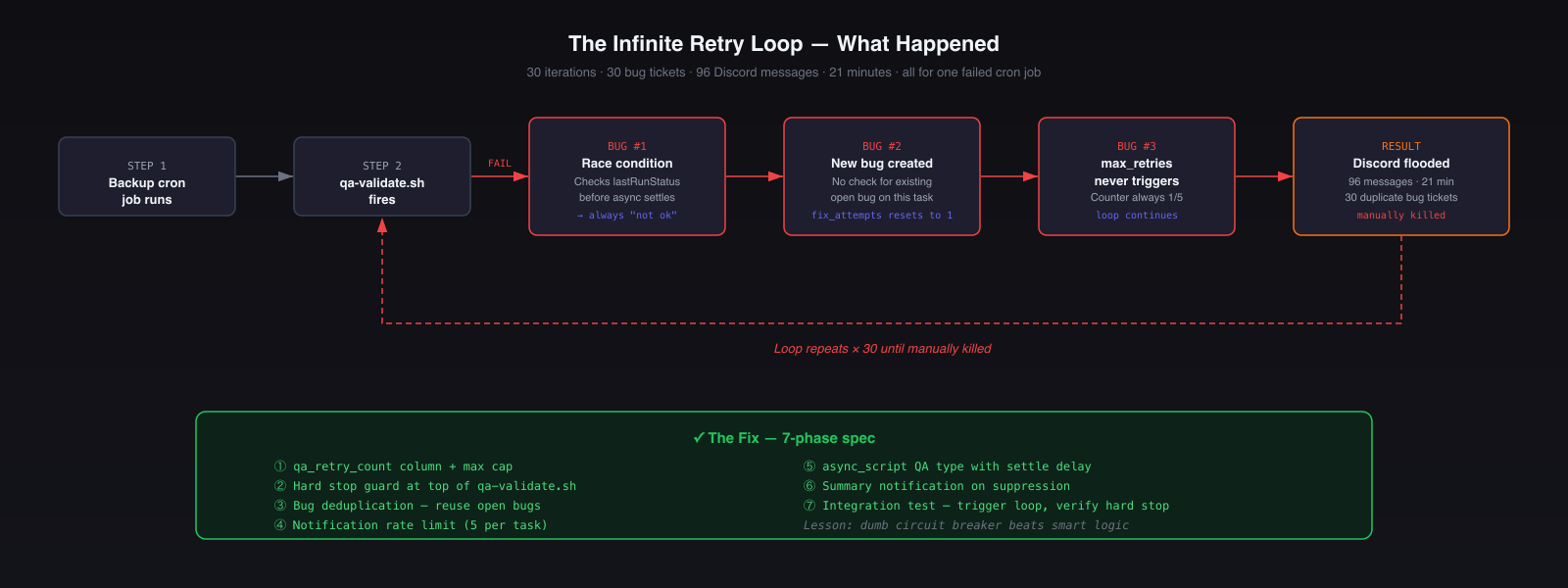
The Infinite Retry Loop (96 Messages in 21 Minutes)
This was the worst failure of the whole build.
A backup job failed QA, which was fine — that’s exactly what QA is supposed to catch. The problem was what happened next: instead of tracking that failure as one ongoing issue, the system kept creating a brand-new bug every time it retried. That meant the retry counter kept resetting, so the “stop after too many attempts” rule never kicked in.
The result: the same failure kept looping, new bug tickets kept getting created, and Discord got flooded with 96 messages in 21 minutes before I manually shut it down.
The core problems were:
- The system didn’t recognize that it was seeing the same bug again
- It checked for success too quickly on an async job, so timing made the failure worse
- There was no cap on how many notifications it could send
I fixed it by adding a hard stop on retries, deduplicating repeated bugs, slowing down checks for async jobs, and capping notifications per task.
Lesson: Any automated loop needs a hard stop. Not a clever one. Just a simple rule that says: no matter what else happens, this ends here.
The Admin Agent: Not Every Query Needs a Frontier Model
One of the best early decisions was adding a local Admin agent that handles simple lookups on my machine.
Not every request needs a powerful cloud model. A lot of what an assistant does day to day is basic: checking the queue, looking up something on the calendar, doing quick math, or pulling a simple record. Those tasks don’t need deep reasoning — they just need to be fast and cheap.
So Higgins routes those lightweight requests locally, and saves Claude for work that actually needs judgment.
That split matters more than it sounds. Once you have lots of small background checks happening throughout the day, pushing the simple ones to a local model cuts costs fast.
The bigger lesson is simple: use the expensive model for the expensive thinking, not for everything.
What the Architecture Looks Like Now
MacBook Pro (local)
├── OpenClaw Gateway (port 18789)
│   └── Higgins — main session (Claude Sonnet)
├── Specialist Agents
│   ├── Builder (Claude Opus) — ~/Projects/*
│   ├── Product (Claude Opus) — specs, strategy
│   ├── Research (Claude Sonnet) — web research
│   ├── Content (Claude Sonnet) — posts, newsletters
│   ├── QA (Claude Sonnet) — validates completed tasks
│   └── Admin (Qwen 32B, local/free) — quick lookups
├── Task Queue (~/.openclaw/queue/)
│   ├── tasks.db (SQLite)
│   ├── queue-task.sh / queue-from-spec.sh
│   ├── qa-validate.sh (with hard stop)
│   └── notify-discord.sh (rate limited)
└── Higgins Services (local web apps)
    ├── Dashboard (8765) — aggregates everything
    ├── CRM (8766) — clients, contacts, interactions
    ├── PM (8767) — tasks, milestones
    ├── Scheduler (8768) — calendar + task scheduling
    └── Content Pipeline (8769) — posts, newsletters
Every task now follows the same path: Higgins → Product (spec) → approval gate → queue → Builder → QA → completion notification.
That structure matters because it removes ambiguity. Higgins handles the request, Product turns it into a clear spec, Builder implements it, and QA checks that it actually works. Each step has a specific job, which makes the whole system more reliable.
Every spec has a standard lifecycle: Draft → Ready → In-Progress → Completed. Automated hooks in the queue scripts keep status current without manual updates.
Local Ollama (Qwen 32B) handles Admin queries at $0/call. Cloud Claude handles everything that requires judgment.
What’s Still Being Built
This system is 10 days old. Things still on the roadmap:
- Spec audit tooling —
audit-specs.shto surface pending work at a glance - Cloudflare automation — Wrangler is now wired in; env vars and deploys no longer require the dashboard
- Adversarial agent checks — what happens when agents disagree or get conflicting instructions
The part I find most interesting is that the infrastructure is starting to eat its own dog food — I use the task queue to improve the task queue, Higgins to spec Higgins, Builder to build better Builder tooling.
That’s probably another post.